Showing posts with label Iphone 5 specification. Show all posts
Tuesday, 29 January 2013

How to insert a photo or videos into an email on iphone

0 comments
In older version of IOS you need photos app to email pictures and videos, iOS 6 adds the ability to insert them directly in to an email. Let me show you how to insert pictures and videos to emails(not documents or anything else)


 →Launch the mail app on your iphone or ipad
 →Tap on the Compose button in the bottom right hand corner just as you normally would to send an email.
              
                  
 →Fill out the sender info like subject and body 
 →Now Double tap where you'd like to insert the image
 →You'll see a menu come up. Tap the arrow to the right of the menu to view more options
 →Here you'll see the options to insert photo or video. Tap on it
 →You'll be taken to your Photos so you can Select the image you'd like to insert
               
 →You'll see a preview of the image . Just tap on choose to confirm it's the right one
                 
 →The image will automaticlly be inserted in to your Email.
                     
 →After filling out your email,just tap the send button in the upper right hand corner and your email,will be on the way.

Continue reading →
Saturday, 26 January 2013

Samsung Wave 3 specification & price

0 comments

    Samsung Wave 3 specification & price


Operating System:
BADA 2.0

Processor:
1.4 GHz

Processor Type:
Single Core

Display Screen Size:
4.0 inches

Display Type: 
WVGA Super AMOLED Touch-Screen
Touch Sensitive
Accelerometer & Proximity Sensor
Multi-Touch Input

Camera Size:
5.0 Mega Pixels

Camera Feature:
Auto-Focus Camera with LED Flash
Full HD Video Recording @ 30 fps
Front Camera for Video Calls

Internal Memory: 
4 GB In-Built
Expandable Memory Slot
Samsung Kies 2.0 Audio
3.5 mm Audio Jack
Polaris Office Caster
Social Networking Apps
Samsung Chat ON Mobile Services
Digital Compass

Internet connectivity: 
3G HSDPA @ 14.4 Mbps, Wi-Fi 802.11 b/g/n Network

Data transfer connectivity: 
Bluetooth v3.0 with A2DP

Battery Model:
Lithium-ion 1500 mAh

Standby: 
up to 517 hours (3G)

Talk time: 
up to 9 hours 20 min

Dimension: 
125.9 x 64.2 x 9.9 mm

Weight: 
122 grams

Samsung Wave 3 price in India is: INR 14900. However the price of  Samsung Wave Y S5380 varies from city to city. If you are looking for the best price in your nearest shop.
Continue reading →
Monday, 21 January 2013

How to install Turbo C on Windows 7 64 bit

0 comments

How to install Turbo C on Windows 7 64 bit

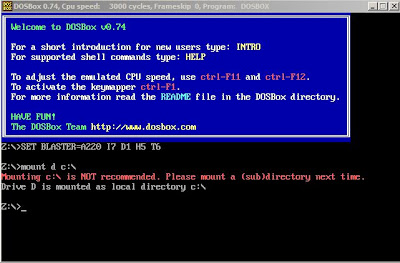
This problem can solved by using a software name called DOSBox. This software will helps you lot of problems of your pc hardware and software utilization. so in order to get things work we need to follow these steps:
                              DosBox for Turbo C++

Installation Process:

                  DosBox Turbo C On windows 7
  • Now you should get a message which says: Drive d is mounted as a local directory c:
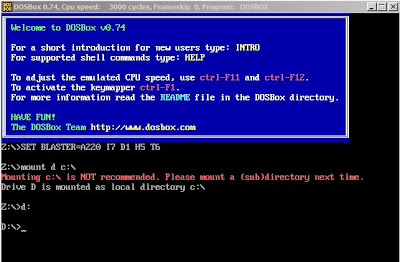
  • Type d: to get into d:
                 DosBox Turbo C On windows 7
  • Next follow the commands below
  • cd tc
                DosBox Turbo C On windows 7
  • cd bin
                DosBox Turbo C On windows 7
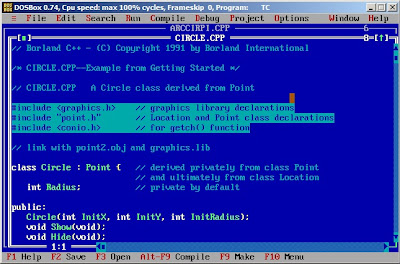
  • and tc or tc.exe(this starts your Turbo C)
                DosBox Turbo C On windows 7
  • (Important steps) In Turbo C Editor, go to options>Directories>changes Directories>Change the source of TC to the source directory
For any more Details  Check out this video httpv://www.youtube.com/watch?v=Fc7D3HLi7Ps

For Full Screen: ALT+Enter.
Continue reading →
Monday, 7 January 2013

Transfer all SMS from a Nokia Symbian Smartphone to Android Smartphone

0 comments

Transfer all SMS from a Nokia Symbian Samrtphone to Android smartphone:

So you got a new Android smartphone and you want to transfer all important data from your old Symbian phone to it. We know how much important is that old data in your old Symbian phone. So generally there are many sites and online services which help you to transfer all the data like Contacts, Calendar entries, Notes, Images, Songs and even SMS to your new Android smartphone but at a very premium price. Some charge more than $20


Well we can easily transfer Contacts, Notes, Calendar entries, Photos and Songs from Symbian to Android but real problem comes for SMS ! There is really nothing any easy application that will directly transfer all your valuable SMS from Symbian phones to Android phones for free! So what to do? Many of us including me faced this big issue for transferring all SMS to Android phones. Most of us either simply sacrificed all those SMS or some still use that old phone for accessing those important SMS !

I searched a lot on the Internet for the easy solution where Rooting is not required of Android Phone but didn’t get easy solution which can be used by any end user and for free! But finally found a solution from some archived threads of XDA Forums.

Steps for Nokia Symbian Phone:
1. Copy all your contacts from your old Nokia Symbian phone to Android Phone as it is by various methods like, Syncing to Outlook etc. If its already done please skip this step.

2. Now download and install Latest Ovi Suite for your Nokia phone from here. http://bit.ly/lB5bTn

3. After installing Nokia Ovi Suite and detecting your Nokia Phone, Please Sync all SMS in Ovi Suite. Remember Sync it and no need of OVI Suite backup of your Nokia Symbian Phone!

4. Disconnect your Nokia Phone and close the Nokia OVI Suite application. WATCH OUT! Nokia OVI Suite likes to minimize to system tray please be sure that its also closed from the System Tray of Windows.

5. Download Nokia2AndroidSMS from the given link and extract all files to Folder called Nokia2AndroidSMS.http://www.mediafire.com/?vmdddmp4ga9sq6x

6. Run Nokia2AndroidSMS.exe extracted from Nokia2AndroidSMS.7z; you will need 7zip for extraction. 

http://www.7-zip.org/download.html 

u can also use winrar

7. The application should automatically find all Data-stores created by Nokia OVI Suite and automatically select the first one.

8. If it should fail to detect Data-stores then you’ll have to find it by yourself, you can either drag and drop Data-store file from Windows Explorer onto the Nokia2AndroidSMS window or use the Open button to find it.

9. You can change the Data-store in the 1st selection list if there is more than one.

10. If you have more than one phone in the Data-store than you can select for which you’d like to export the messages, they are listed by their IMEI number.

11. Press Convert button and now you should get an xml file in the same folder you extracted Nokia2AndroidSMS application.

Steps for Android Phone:
1. Install ‘SMS Backup & Restore’ from Android Market. Or check the link http://bit.ly/hSNLDm 

2. Connect your Android phone to the PC by using supplied Micro-USB Cable. (You MUST select Disk drive as connection type).

3. Now copy the xml file (which was created after Step 11) into the ‘SMSBackupRestore’ Folder on the phone, (Please create it if it’s not already made by the App in your Android phone’s Mass Storage or Memory Card).

4. Now simply Run SMS Backup & Restore and click on ‘Restore’ button to import messages.

5. After importing all SMS it will create threads as per contacts in your Android phone’s default SMS application.

Continue reading →

Tricks and secret codes of Iphone every user should know

0 comments

Tricks and secret codes of Iphone every user should know

Apple iPhone Smartphone’s operating system iOS also have some secret codes for multiple purposes like easy access to setting and etc. Now I'm going to share some of them with you guys hopefully you will find them useful.

*#06# - It is use to show IMEI of any phone means it will work on any Smartphone or mobile of any brand.
*#21# - It gives information about the configuration of forwarding (calls, voice and data.)
*#30# - Its functions is to report you either you enable / disabled status of calling line presentation.
*#33# - This secret of iPhone will give you a list with multiple configurations like (call, sms, data, fax, sms, etc) and show whether they are enabled or not.
*#43# - usually use to verify status of call waiting like sms, data, sync data, etc. in your iPhone.
*#61# - Checking of number of missed calls.
*#62# - verifies the number for forwarding calls in case of none of service is available.
*#67# - check the numbers for forwarding calls if your iPhone is busy.
*#76# - By typing this number will give you information about your line presentation enabled or disabled status.
*225# – This code is only available for prepaid lines in order to show the accounts bill balance.
*646# - Tel you information of the minutes remained in your account and only valid for only Postpaid ones.
*777# - You can know detailed information of account balance of prepaid iPhones
*3282# - Get know about the use of data information.
*3001#12345#* - it is use to reveal internal setting like Open the "Field Test" of the iPhone which enables us to learn many advanced data network from our iPhone. GSM, Wireless, 3G ... everything will be exposed here.

These codes are applicable to all models of Apple iphone like 1, 3G, 3GS, 4, 4S, and definitely for the upcoming iPhone 5. 
Continue reading →
Tuesday, 18 December 2012

iphone 5 specification,reveiw&price in india

0 comments

          Iphone 5 specification,reveiw&price in india

Apple iphone 5 is the thinnest and the lightest iphone. the device is the sixth generation iphone from the cupertino based technology company.Apple iphone 5 comes with most advanced features on the internal and external design aspect as well. The device has a powerful A6 Qud-core chipset and runs on the most advanced Apple ios 6.The device has a large 4-inch LED backlit retian display brushed up with Oleophobic coating. Apple iphone 5 is incredibly faster for browser and connecting to internet. The new apple iphone 5 sports an 8.0 Megapixel rear-facing camera with isight technology.additionally,the device has 1.2 Megapixel front facing camera for vedio chat. The device users can now record high quality 1080p HD vedios using the rear-shooter and watch on big screens via Airplay.


Specifications of iPhone 5
»Network : 2G, 3G/EVDO and LTE in both CDMA and GSM
»OS : iOS 6
»Display : 4” (640 x 1136) LED-backlit IPS TFT
Capacitive  Touchscreen with the pixel density of 326 ppi also
known as Retina display
: Multitouch support with protection of
Corning Gorilla Glass, oleo-phobic coating
»Camera : 8 MP autofocus, LED flash with Geo-Tagging
: Video :- Full HD(1080p) @ 30fps,Video Light
: 1.2MP secondary camera for video calling/chat
Can record HD(720) video at 30 FPS
»Memory : 16/32/64GB(internal) non expandable
: 1 GB RAM
»Performance :» Chipset: Apple A6 (double faster than previous A5)
:» GPU: integrated with chipset
»Sensors : Accelerometer, proximity, compass, gyro
»Browser : HTML( of course Safari)
»Battery : Built-in rechargeable lithium-ion battery(Apple didn’t reveal its capacity)
»Special Features + common features
- New lightning connector for sync your iPhone(or recharge it)
- Wi-Fi(a/b/g/n), superb Wi-Fi speed (802.11n 2.4GHz and 5GHz),
Hotspot  support
- Bluetooth 4.0( no file transfer as usual)
- GPS with A-GPS, GLONASS,Digital compass
- TV out, iCloud, Maps and the new features available for iOS 6, like Facebook and Twitter integration and so on.

Enhanced Hd vedio recording

Record stunning 1080p HD veiod with the isight camara

You can use your front came for self-portraits or recording 720p HD vedios

With one smooth motion you can shoot up to an impressive 240 degrees 

iphone 5 inside the box


Price in india:

Iphone 5 is available in three different models of differents prices that includes 
16GB-Rs45,500
32GB-Rs52,500
64GB-Rs59,500
It is available in black,slate color & white color.


Continue reading →